Use JPG for photos and PNG for everything with sharp edges: screenshots, logos, charts, text and anything that needs a transparent background. JPG makes photos many times smaller with no visible change, but on flat graphics it blurs the edges and, in our tests, made the file bigger, not smaller.
JPG and PNG at a glance
| JPG | PNG | |
|---|---|---|
| Full name | JPEG (Joint Photographic Experts Group) | Portable Network Graphics |
| Introduced | 1992 | 1996 |
| Compression | Lossy: drops detail you're unlikely to notice | Lossless: keeps every pixel exactly |
| Transparency | No | Yes |
| Best for | Photos to share, print or upload | Screenshots, logos, charts, text, graphics |
| Opens in | Every computer, phone, app and website | Every computer, phone, app and website |
What happens to file size
We measured this with FileFleet's own converters at their default quality (85%) in November 2026. Your files will differ, but the direction is usually the same.
| Test image | As PNG | As JPG | JPG compared with PNG |
|---|---|---|---|
| A 2400 × 1350 photo | 4.10 MB | 215 KB | About 20× smaller |
| A 1440 × 860 website screenshot | 155 KB | 65 KB | 58% smaller |
| A 1200 × 500 logo on white | 17 KB | 20 KB | 17% bigger |
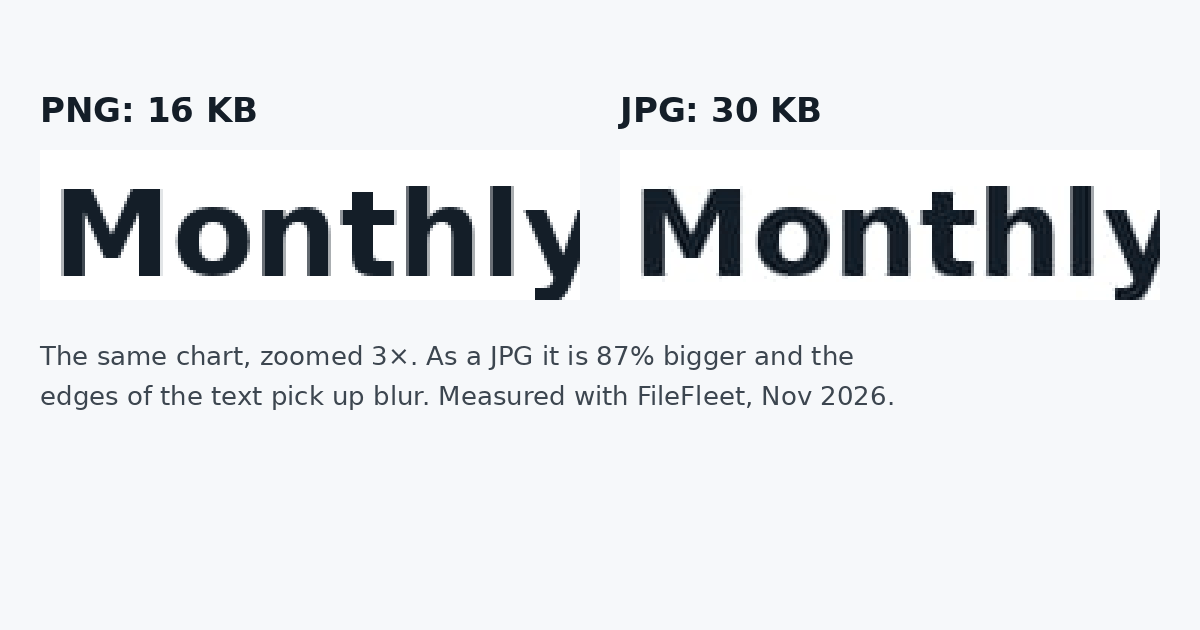
| A 1200 × 700 bar chart with labels | 16 KB | 30 KB | 87% bigger |
The pattern: the more a picture looks like a photo (gradients, texture, millions of colours), the more JPG shrinks it. The more it looks like a drawing (flat colour, hard edges, text), the better PNG does. A website screenshot sits in between: it shrank as a JPG because the page had photos on it, while the chart and the logo, which had none, grew.
What happens to quality
JPG saves space by approximating each small block of the picture. In a photo you won't see it. Along a sharp edge, such as black text on white, it leaves faint grey smudges. In our chart test, the JPG changed pixels around every letter, by up to 65 of 255 brightness levels, which is visible when you zoom in, and worse after the image is resized or saved again.
PNG never changes a pixel. Saving a PNG ten times gives the same image ten times; editing and re-saving a JPG can add a little more blur each time. That's why PNG is the safer format for anything you'll edit and save repeatedly.
Converting a JPG to PNG doesn't bring back lost detail. PNG stores the pixels exactly as they are now, blur included, in a much bigger file.
Transparency
Only PNG can have a see-through background. A logo or signature you want to place on a coloured page, a website or a document needs to be a PNG. If you save a transparent PNG as JPG, the transparent parts turn into a solid colour, usually white.
To make the white around a logo or signature transparent, use Make image transparent (step by step: How to remove a white background from a logo). For photos of people or products, Remove background cuts out the subject.
When to use JPG
- Photos from a phone or camera, for sharing, email or printing.
- Upload forms with a size limit: a JPG photo fits far more easily. If a form asks for an exact size, Compress image to 100 KB and the other exact-size tools get it under the limit.
- When a site or form only accepts JPG.
When to use PNG
- Screenshots, especially of text, code, spreadsheets or apps.
- Logos, icons, charts, diagrams and anything with text on it.
- Anything that needs a transparent background.
- Graphics you'll keep editing and saving.
How to convert between them
- PNG to JPG: for photos saved as PNG that are too big to send or upload.
- JPG to PNG: when an app or form insists on PNG, or before editing a graphic many times.
- Convert image: any of JPG, PNG, WebP and AVIF, including iPhone HEIC photos.
- Compress image: makes JPGs smaller with a quality setting, and PNGs smaller without changing a single pixel.
All of them work in your browser, free, and your files are never stored.
FAQ
Which is better quality, JPG or PNG? PNG, always: it keeps every pixel. But for photos, a JPG at a good quality setting looks the same to the eye at a fraction of the size, so JPG is usually the better choice for photos.
Why is my PNG so much bigger than the JPG? Because it's a photo. PNG stores every pixel of a photo's fine detail exactly, which takes a lot of space. In our test, the same photo was 4.10 MB as PNG and 215 KB as JPG.
Does converting PNG to JPG lose quality? Yes, a little. For photos you're unlikely to notice. For text, logos and charts you may see soft or smudged edges, and the file can even get bigger.
Can a JPG have a transparent background? No. If you need transparency, save as PNG.
Should I save screenshots as JPG or PNG? PNG for screenshots of text, apps and documents: they stay sharp. If the screenshot is mostly a photo and you need a smaller file, JPG is fine.
What about WebP? WebP can do both jobs, small photos and transparent graphics, and opens in modern browsers, but some older apps and upload forms don't accept it. Convert image turns WebP into JPG or PNG when you need to.
The verdict: photos → JPG. Screenshots, logos, charts, text and transparency → PNG.